Frontend testing appoach
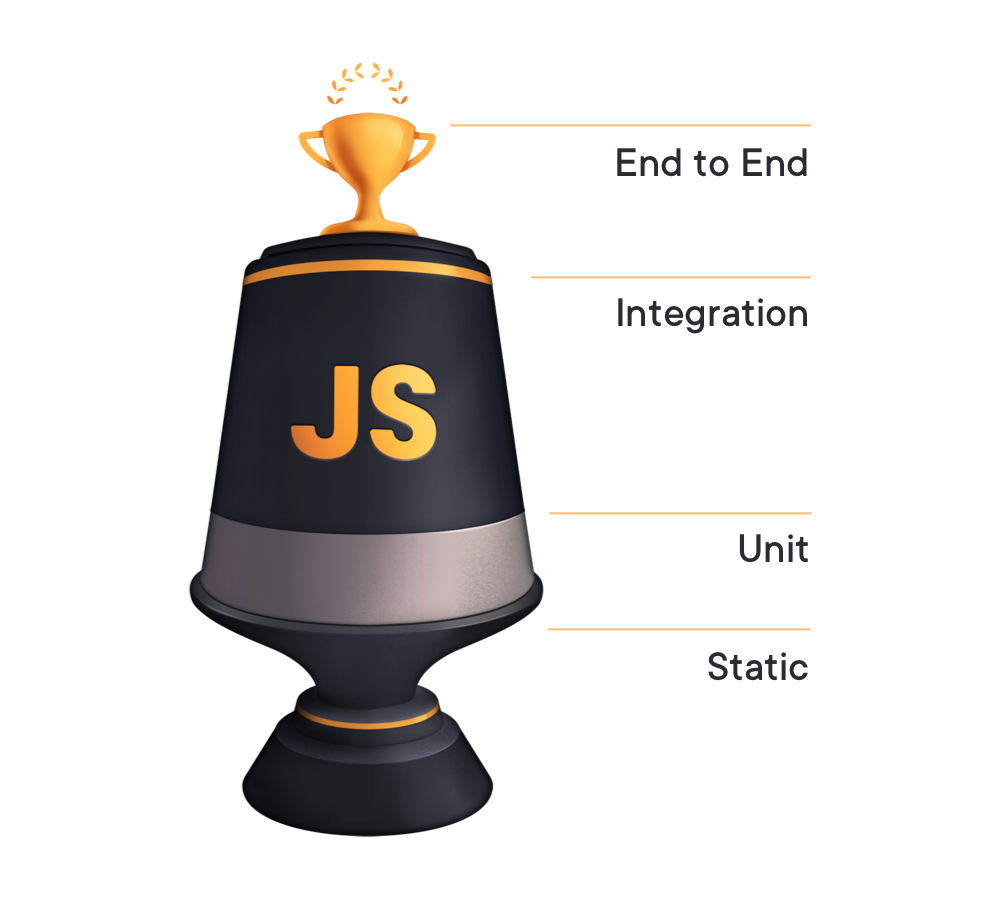
The Testing Trophy
A four-layer proven method for testing software
Testing implementation details
Why this is bad?
- Can break when you refactor application code. False negatives
- May not fail when you break application code. False positives
React testing library
Make testbase maintainable in the long run so refactors of your components don't break your tests and slow us down.
The more your tests resemble the way your feature is used, the more confidence they can give you.
So how does this translate to code?
Step 1 - Write test cases out
- Look at that code and consider who the "users" are in our example (The developer rendering the group search, the end user entering a place and doing a search)
- Write down a list of instructions for that user to manually test that code to make sure it works as expected(can sometimes but helpful to think about acceptance cretia).
- Turn the list into automated tests!
Step 1 - Group search test cases
 // Should not have basic accessibility issues
 // Should not show the dropdown of places when a postcode as been entered
 // Should show the dropdown of match when a place as been entered
 // Should not show the dropdown if less than 3 character have been entered
 // Should show a error message if there are no matches for a place
 // Should include the search term in the suggestation
 // Should trigger error message if user submits without entering a value
 // Should trigger error message if user enters an invalid postcode
// FreeTextGroupSearch > __tests__ > FreeTextGroupSearch.spec.js

import 'jest-dom/extend-expect';
import React from 'react';


describe('FreeTextGroupSearch', () => {
    afterEach(cleanup);
    it('The component mounts', async () => {
      const { container } = render(
            <FreeTextGroupSearch />
      );
    });
  });
import { render, fireEvent, cleanup } from '@testing-library/react';
import 'jest-dom/extend-expect';
import React from 'react';
import { Provider } from 'react-redux';
import configureStore from 'redux-mock-store';
import mockTowns from './towns-mock.json';

const mockStore = configureStore();
const townStore = mockStore(() => nearestGroupState);

const nearestGroupState = {
    async: {
      actionTypes: {},
    },
    view: {
      nearestGroup: {
        allTowns: mockTowns.towns,
      },
    },
};

describe('FreeTextGroupSearch', () => {
    afterEach(cleanup);
    it('The component mounts', async () => {
      const { container } = render(
         <Provider store={townStore}>
             <FreeTextGroupSearch />
         </Provider>,
      );
    });
  });
jest FreeTextGroupSearch.spec.js --watch
import MarshalContext from 'common/src/app/util/testing/MarshalContext';
import nearestGroupGeoLocationLocale from 'components/molecules/NearestGroupGeoLocation/locale/nearest-group-geo-location.en-GB.json';
import validationLocale from 'common/src/app/locale/validation.en-GB.json';
import nearestGroupSearchBarLocale from
'../../../../locale/nearest-group-search-bar.en-GB.json';

const contextMessages = {
    ...nearestGroupSearchBarLocale,
    ...nearestGroupGeoLocationLocale,
    ...validationLocale,
};

describe('FreeTextGroupSearch', () => {
    afterEach(cleanup);
    it('The component mounts', async () => {
      const { container } = render(
         <Provider store={townStore}>
             <MarshalContext messages={contextMessages}>
               <FreeTextGroupSearch  / >
             </MarshalContext>
         </Provider>,
      );
    });
  });
jest.mock('../../../src/app/config/market/market.configdefinitions', () => ({
  // the value to mock
}));
it('Should show the dropdown of match when a place as been entered', () => {
const { getByTestId } = render(
     <Provider store={townStore}>
         <MarshalContext messages={contextMessages}>
             <FreeTextGroupSearch />
         </MarshalContext>
     </Provider>,
 );

 fireEvent.change(getByTestId('free-text-group-search-input'), { target: { value: 'Der' } });
 expect(getByTestId('dropdown-results-list')).toBeVisible();
 });
import { axe, toHaveNoViolations } from 'jest-axe';
expect.extend(toHaveNoViolations);

describe('FreeTextGroupSearch', () => {
    it('Should not have basic accessibility issues', async () => {
        const { container } = render(
             <Provider store={townStore}>
                 <MarshalContext messages={contextMessages}>
                     <FreeTextGroupSearch />
                 </MarshalContext>
             </Provider>,
        );

        const results = await axe(container);
        expect(results).toHaveNoViolations();
    });
}
Cavats
Missing mock init action & redux forms, passing in param to locale.What is the expectation?
- Going forward we should be writing tests for new components or components that already exisit that we are upgrading functionality of and that do not use init action or redux form.
- If we are unable to write tests for a component we should be refactoring it so that we can even if it ends up taking longer as a result.
- We should be looking to test components at more of a granular level where possiable.
- Not having test should be highlighted in PR and blocking(unless circumstances of hotfixes)
How can you learn?
- Complete everything within the resource pack
- Refer to documentation and wider community for examples (found within the resources pack)
- Looking at other examples in our codebase
- The best way to learn is by doing!!